
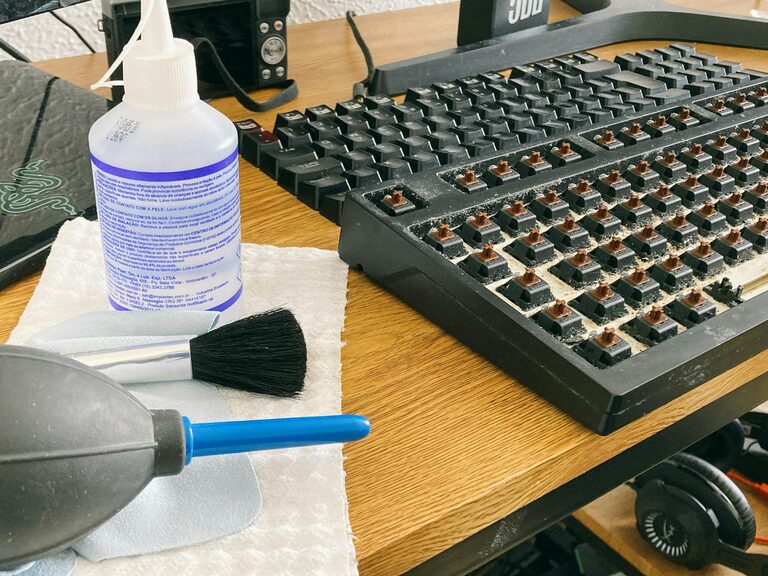
Keeping your phone and keyboard clean is essential for both hygiene and the longevity of your devices. Daily use exposes them to dirt, oils, and germs that can build up over time, potentially causing malfunctions or health issues. However, cleaning electronics requires care to avoid damage. This guide shares safe, easy methods to clean your phone and keyboard effectively.
Why Clean Your Phone and Keyboard?
Phones and keyboards are among the most frequently touched objects in our daily lives. Studies show these devices can harbor thousands of bacteria, including some that cause common illnesses. Regular cleaning reduces this risk and can also improve the appearance and functionality of your gadgets.
Additionally, dust and debris on keyboards can interfere with key movement, leading to typing issues, while fingerprints and smudges on phone screens can reduce visibility.
What You’ll Need Before Starting
Gather these supplies to clean your devices safely:
– Microfiber cloths (soft and lint-free)
– Isopropyl alcohol (70% or less) or electronics-safe cleaning solution
– Distilled water
– Cotton swabs or soft-bristled brush
– Compressed air canister
– Small bowl for mixing solution (optional)
– Plastic toothpick or cleaning putty (optional for keyboard crevices)
Avoid household cleaners with bleach, ammonia, or abrasives, as they can damage device surfaces.
How to Clean Your Phone Safely
Step 1: Power Off and Unplug
Always turn off your phone and unplug any cables before cleaning. This reduces the risk of electrical issues or accidental inputs.
Step 2: Remove Case and Accessories
Take off your phone case and any screen protectors for thorough cleaning. Cases accumulate dirt as well, so clean them separately according to their material.
Step 3: Prepare Cleaning Solution
Mix a 50/50 solution of distilled water and isopropyl alcohol, or use a screen-safe cleaning spray. Avoid using pure alcohol, as it may damage coatings on your screen.
Step 4: Wipe the Surface Gently
Dampen a microfiber cloth slightly with the solution—do not soak it. Gently wipe the phone’s screen, back, and edges. Avoid letting moisture seep into openings like charging ports and speakers.
Step 5: Clean Buttons and Ports with Care
Use a dry cotton swab or a soft brush to clean around buttons and inside ports. Compressed air can help blow out lint or debris but hold the can upright and use short bursts to prevent moisture release.
Step 6: Dry and Reassemble
Let the phone air dry completely before turning it back on or putting the case back on.
How to Clean Your Keyboard Safely
Step 1: Unplug or Power Off
If you have a wired keyboard, unplug it from your computer. For wireless keyboards, turn them off and remove batteries if possible.
Step 2: Remove Loose Debris
Turn the keyboard upside down and gently shake or tap it to dislodge crumbs and dust. Use compressed air to blow out particles stuck between keycaps.
Step 3: Clean the Keycaps Surface
Dampen a microfiber cloth with the same water-alcohol solution used for your phone. Wipe the surface of the keys and surrounding areas. For stubborn grime, gently scrub with a soft brush.
Step 4: Deep Clean Between Keys
For mechanical or removable keycap keyboards, consider popping off keycaps carefully using a keycap puller. Soak the keycaps in warm, soapy water for 30 minutes, rinse, dry thoroughly, and reattach.
If your keyboard doesn’t allow key removal, use a cotton swab or a toothpick wrapped in the cloth to get into tight spaces.
Step 5: Disinfect (Optional)
If disinfecting, avoid bleach or harsh chemicals that can discolor or erode plastic. Isopropyl alcohol is effective and safe when used properly but use sparingly.
Step 6: Let It Dry
Ensure the keyboard is completely dry before reconnecting or powering it up to avoid electrical issues.
Tips to Keep Devices Clean Longer
– Wash hands before using your phone and keyboard.
– Avoid eating over your keyboard or handling your phone with greasy or dirty hands.
– Regularly clean your devices at least once every one to two weeks.
– Use device covers and keyboard protectors to reduce dust buildup.
– Store your phone and keyboard in clean, dust-free areas when not in use.
Avoid These Common Mistakes
– Never spray cleaners directly on devices; always apply on a cloth first.
– Avoid using abrasive cloths, paper towels, or tissue, which can scratch surfaces.
– Don’t use household disinfectants like bleach, window cleaners, or ammonia on electronics.
– Do not submerge electronic devices in water or cleaning solutions.
– Avoid excessive moisture near openings to prevent damage to internal components.
Conclusion
Cleaning your phone and keyboard may seem like a chore, but with the right approach, it’s simple and highly beneficial. Regular, gentle cleaning keeps your devices looking good, functioning properly, and helps reduce the spread of germs. Use the steps and tips above to maintain your tech safely and effectively.
Remember, a little care goes a long way in prolonging the life of your favorite gadgets!